Minecraft Minions Mod 1.15.2,1.12.2, 1.10.2 and 1.7.10 – Dig Mineshafts Automatically
What is Minions Mod?
Minecraft Minions is a mod that allows you to forget about some of the basic tasks of the game, such as going to mine, collecting wood, hunting animals, etc.
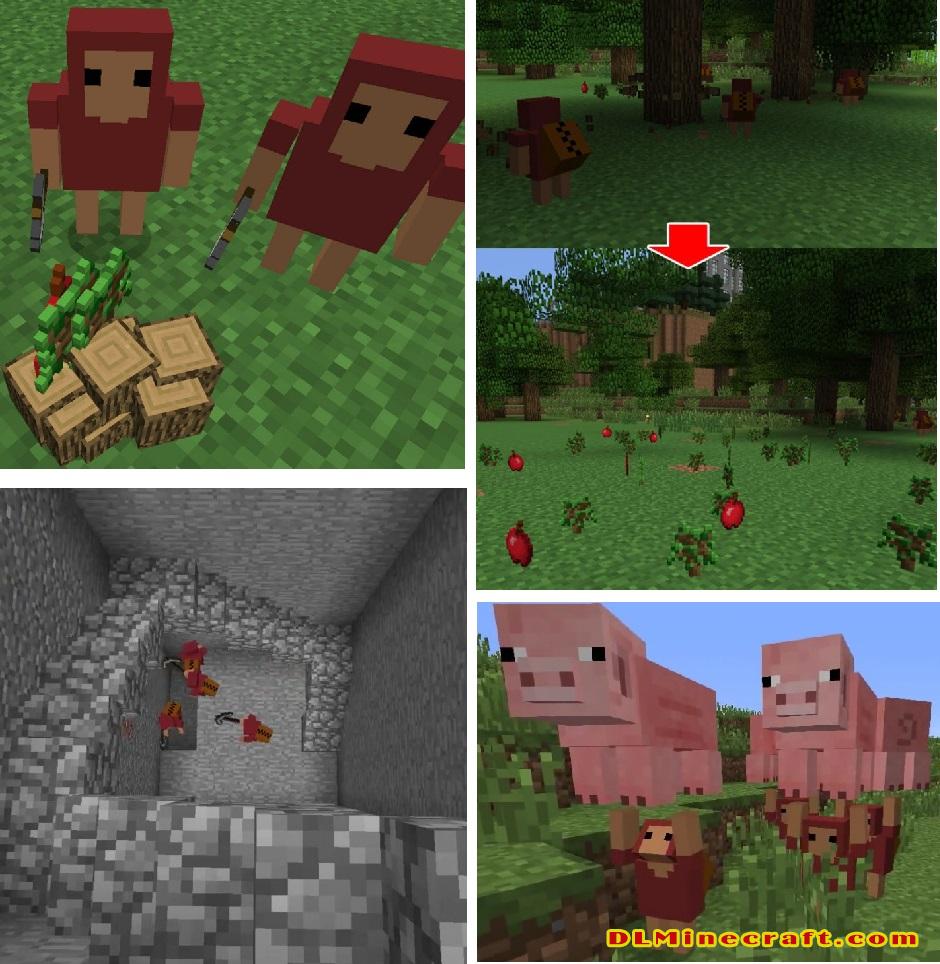
All this can be delegated thanks to a magic wand that adds the mod, which allows us to turn any animal in the game into a monkey that will work for you, although there is a maximum of 4 monkeys for each player.
They themselves take care of saving in chests all those resources they get so that you only have to go to a chest and take out the resources. Besides, when they mine, they light up your mines by putting torches on the walls.
Features:
- Follow you around.
- Be sent to places.
- Chop down most any kind of trees, including Jungle giants.
- Carry you, animals and other players.
- Pickup and carry Items in their inventory.
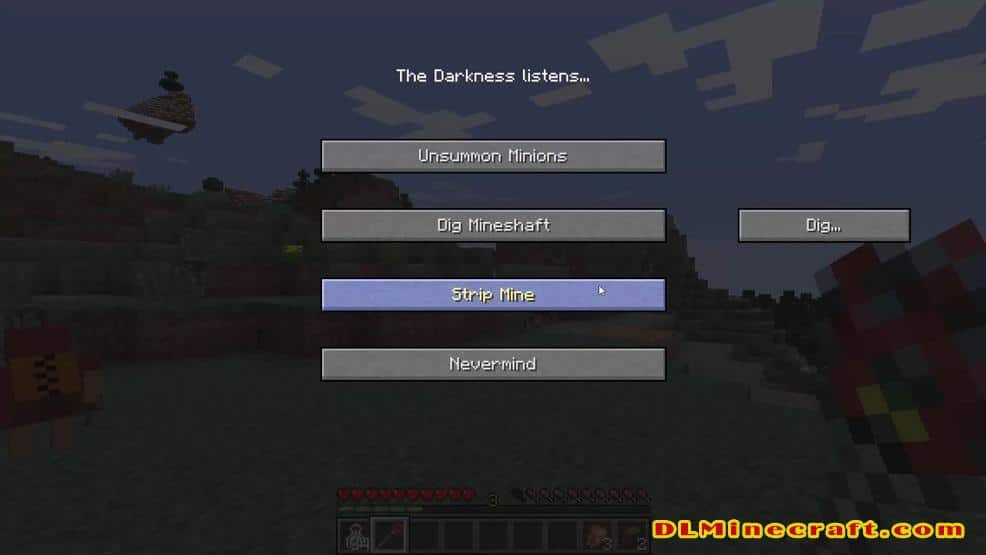
- Dig mineshafts complete with stairwell.
- Dig out a custom sized space you define.
- Mine ore veins you point out to them.
- Intelligently strip mine where you tell them to.
- Return their goods and loot to you.
- Or to a Block with inventory (> 23 slots) you pointed out.
Specific technical information for those interested:
- Minions use an A-star algorithm custom pathing system. It’s threaded and multicore-capable.
- Hitches and problems/teleporting you see all stem from Minecraft pathfollowing, which is … lets call it suboptimal.
- The tree finding algorithm is threadbased aswell, and stops when it has found 16 trees or has scanned a 64×64 area. It supports mod Tree’s so long their custom Tree blocks have “wood” in their name.
- Animal abduction works on all entities that extend EntityAnimal.
- Strip mining scans the walls and roofs of the dug shaft continuously for precious blocks. Anything that is not worthless (eg dirt, stone, gravel…) is considered precious, so it fully supports mod ores.
- Giving the order to mine an ore vein or having found such a vein while strip mining, the Minion will follow the vein and mine all connected Blocks of the same kind until there are no more. Then it will return to the player, or, if it was stripmining, return to that.
- They don’t come for free, you have to prove your worth by slaying living beings (to accumulate levels) and then take action for the dark gods. Only after a number of evil deeds they may grant you minions.
Short Minion Handbook:
- Kill enough stuff to reach lvl 8.
- Press M and do evil 4 times.
- Receive Master Item.
- Leftlick Master Item for Lightning Bolts.
- Rightclick Master Item to spawn Minions.
- Rightclick to issue orders, context-sensitive (a place, trees, an animal, an ore vein, your feet).
- Also press M for mining shapes.
- Rightclick chest (FROM DISTANCE) to set it as destination.
- Charge staff like a bow to have minions follow you.
- Rightclick minions to have them drop whatever they have.
- Leftclick Minions for working incentive …. mueheheheh.
Minions are fully compatible with SMP. However there may be oddness regarding their movement and animations
Default settings: (configurable by the file in the /mods/ folder)
- Minions main menu: “M“.
- Maximum Minions per player: 4.
- Cost of evil Deed: 2 levels.
- – 4 evil deeds are required to gain minions.
FAQ:
Which is the latest version of Minecraft Forge?
The latest version of Minecraft Forge is 1.16.5. The latest recommended version of Minecraft Forge is 1.15.2; Minecraft Forge (Modding API) is heavily installed at versions 1.15.2,1.12.2. Some mods require a specific version of Minecraft Forge. New version of Minecraft Forge 1.16.5 has less testing, and many mods do not support it.
How do you download Minecraft Forge?
First, head to Minecraft forge and download the program. You want to make sure that you download the version of Forge that corresponds to the version of Minecraft you have, Select the Minecraft Forge menu on the right side of this website.
Do you have to have Minecraft to use forge?
Yes, Make sure you have Minecraft installed.Minecraft Forge only works for Minecraft: Java Edition. Minecraft for PC, XBox One and PS4 cannot be modded.
Is modding Minecraft illegal?
No, modding Minecraft is not illegal.
Related Mods:
How to install Minecraft Minions Mod With Forge
- Make sure you have Minecraft Forge
- Download Minecraft Minions Mod file from link(s) below/above
- On PC Windows, Go to the Start menu
Type: %appdata%/.minecraft
Press Enter to Run %appdata%/.minecraft
- On MacOS open finder, hold down ALT and click Go then Library in the top menu bar. Open the folder Application Support and look for Minecraft.
- Go to minecraft/modsfolder
If Mods folder does not exist, create one
- Put Minecraft Minions Mod file into the mods folder
- Launch Minecraft using Forge Profile, then Open Menu
- Enjoy!
Minecraft Forge(Modding API) Installation Guide
5 steps to successfully install Forge Minecraft
1. Access and Download select Minecraft forge version, then download the installer.
2. Requires installing Java on a computer. Open the .jar file you just downloaded, make sure ‘Install Client’ is selected, and click the OK button.
3. Run Minecraft and select the Forge profile, then click Play.
4. Select the Minecraft Forge menu on the left and the Mods button below Multiplayer.
5. Successfully, you can enjoy the mod just installed.
Download Minecraft Minions Mod for Minecraft 1.15.2,1.12.2, 1.10.2 and 1.7.10
Credit: AtomicStryker ❘ Rating: 4.73 − 158 votes